


Every time you load a product catalog, watch an online video, or check your account details, caching is working behind the scenes to deliver that information in milliseconds. But what exactly is caching, and why is it so critical for modern applications?
In this deep dive, we’ll explore caching mechanisms, how they work, and when to use each type to build high-performance systems.
#What is Caching?
Caching is the practice of storing frequently accessed data in a temporary, high-speed storage layer. Instead of repeatedly querying your database or making expensive API calls, your application serves data from the cache dramatically reducing response times and server load.
Think of it like keeping your most-used tools on your desk instead of walking to the storage room every time you need them. The principle is simple: faster access equals better performance.
#Why Caching Matters
Modern applications face massive scale challenges:
- Amazon processes 13,000+ orders per minute during peak times
- YouTube streams over 1 billion hours of video per day
- Netflix serves petabytes of video content to 230+ million subscribers
Without caching, these systems would collapse under their own load. Here’s what caching provides:
Performance Gains: Reduce response times from hundreds of milliseconds to single-digit milliseconds
Cost Reduction: Fewer database queries mean lower infrastructure costs and reduced server load
Scalability: Handle 10x more requests with the same infrastructure
Better User Experience: Fast-loading pages keep users engaged and improve conversion rates
#The Cache Hit and Cache Miss
Understanding cache hits and misses is fundamental to grasping how caching works.
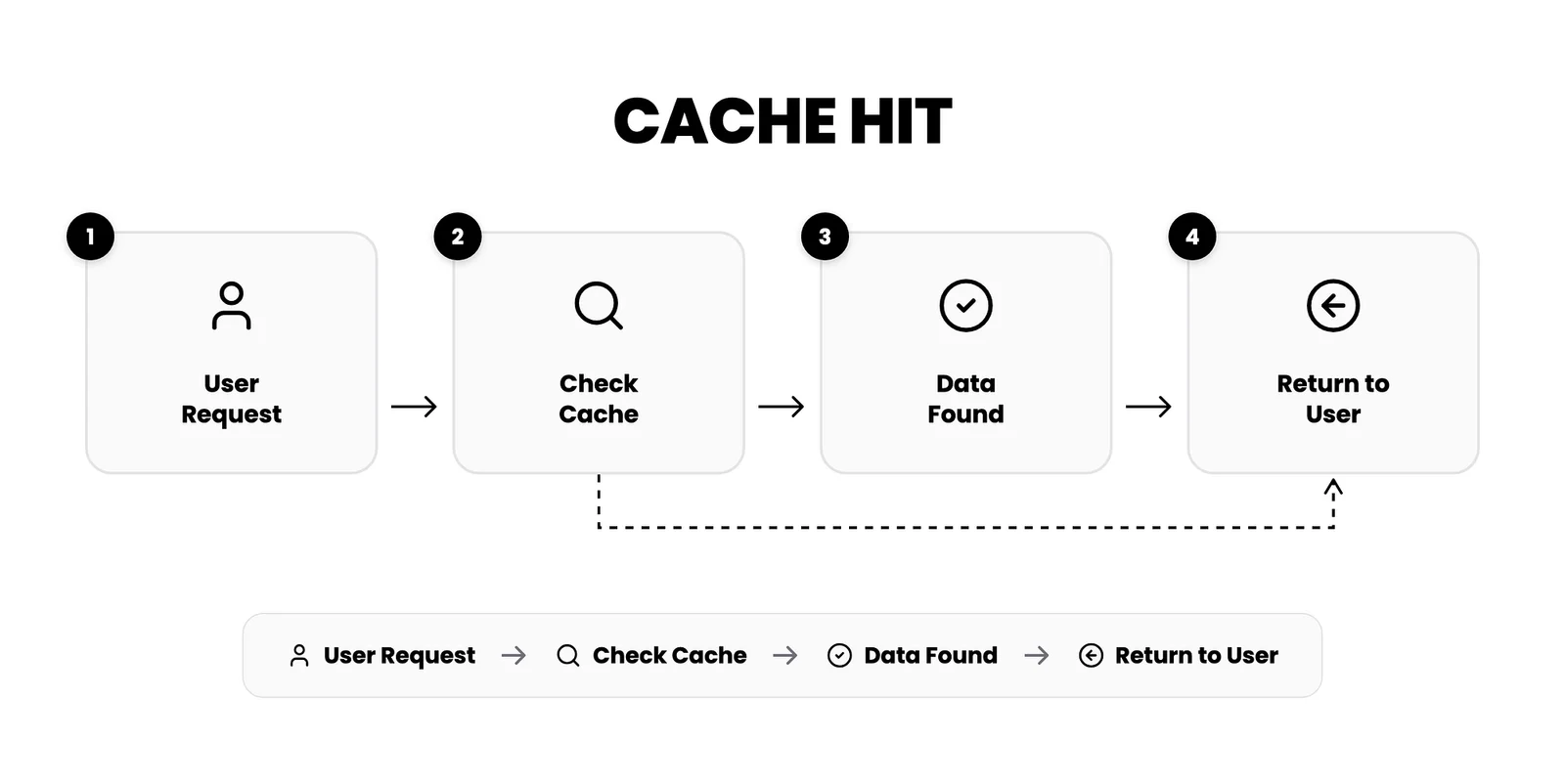
#Cache Hit
When a user requests data that exists in the cache, the application retrieves it directly from cache memory. This is fast typically 1–5 milliseconds.
#Cache Miss
When requested data isn’t in the cache, the application must:
- Query the database or original data source
- Retrieve the data (50–200 milliseconds or more)
- Store the result in cache for future requests
- Return the data to the user
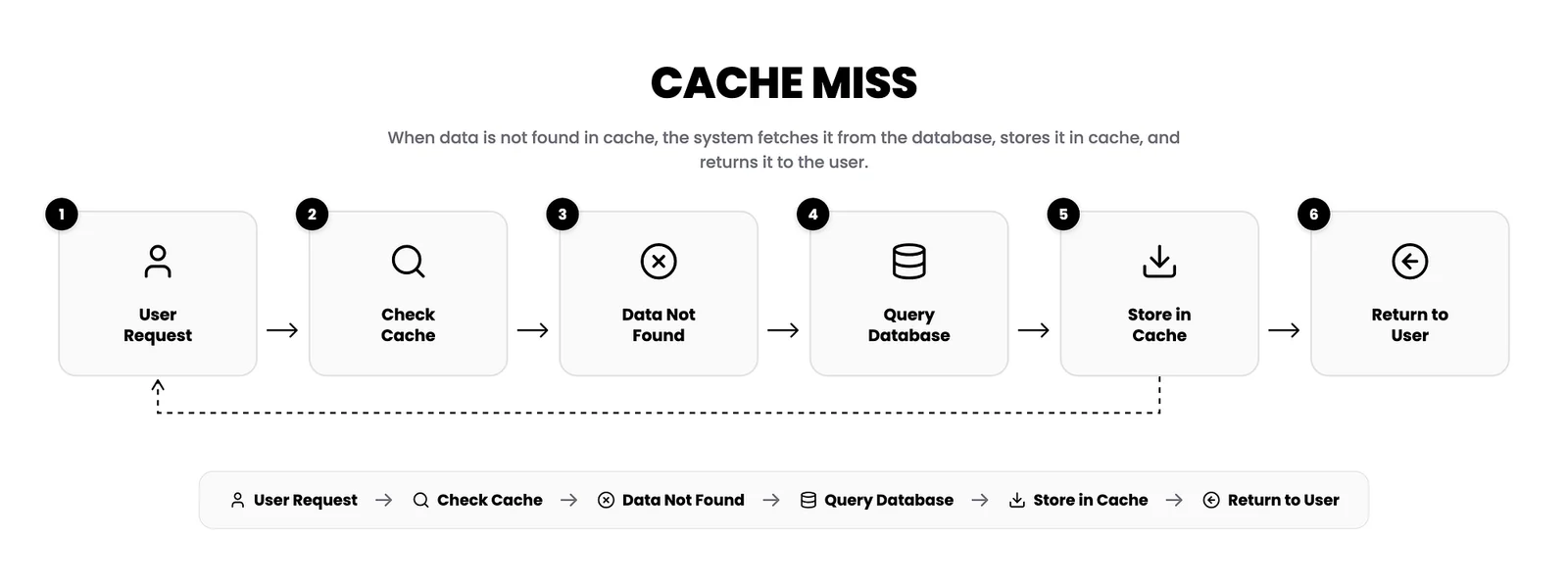
The goal of any caching strategy is to maximize cache hits while minimizing cache misses.
#Types of Caching Mechanisms
Different applications require different caching strategies. Let’s explore the four main types:
#1. Application Server Cache
The most straightforward caching approach involves storing data in memory on your application server.
How it works: When your Node.js, Java, or Python application receives a request, it first checks its local in-memory cache before querying the database.
Use cases:
- Small to medium-sized applications
- Single-server deployments
- Session data storage
- API response caching
Example Implementation (Node.js):
const cache = new Map();

async function getUserProfile(userId) {
  // Check cache first
  if (cache.has(userId)) {
    return cache.get(userId);
  }

  // Cache miss - query database
  const user = await db.users.findById(userId);

  // Store in cache
  cache.set(userId, user);

  return user;
}Limitations: When you scale to multiple servers, each server maintains its own cache. A request to Server A might cache data that Server B doesn’t have, leading to frequent cache misses and inconsistent behavior.
#2. Distributed Cache
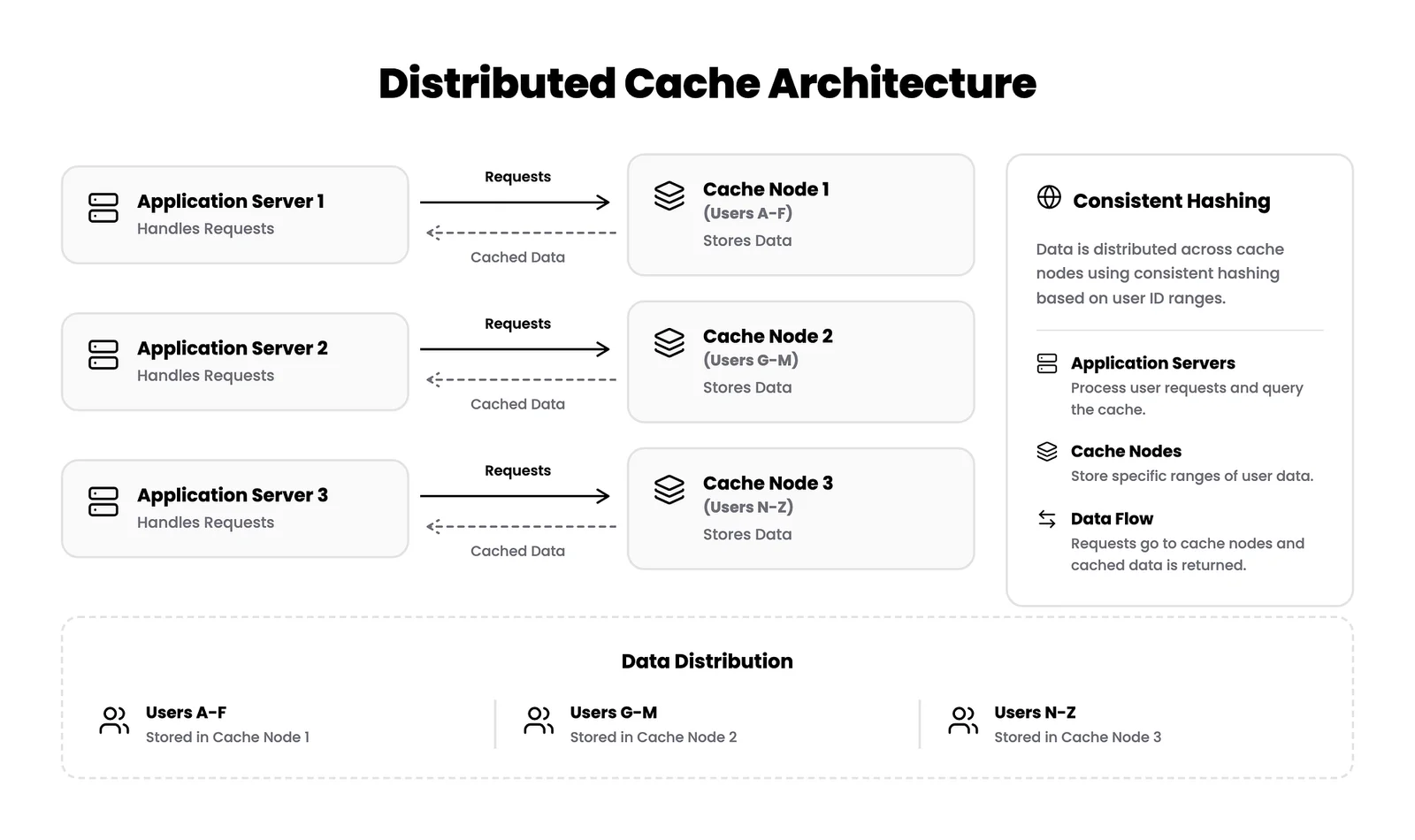
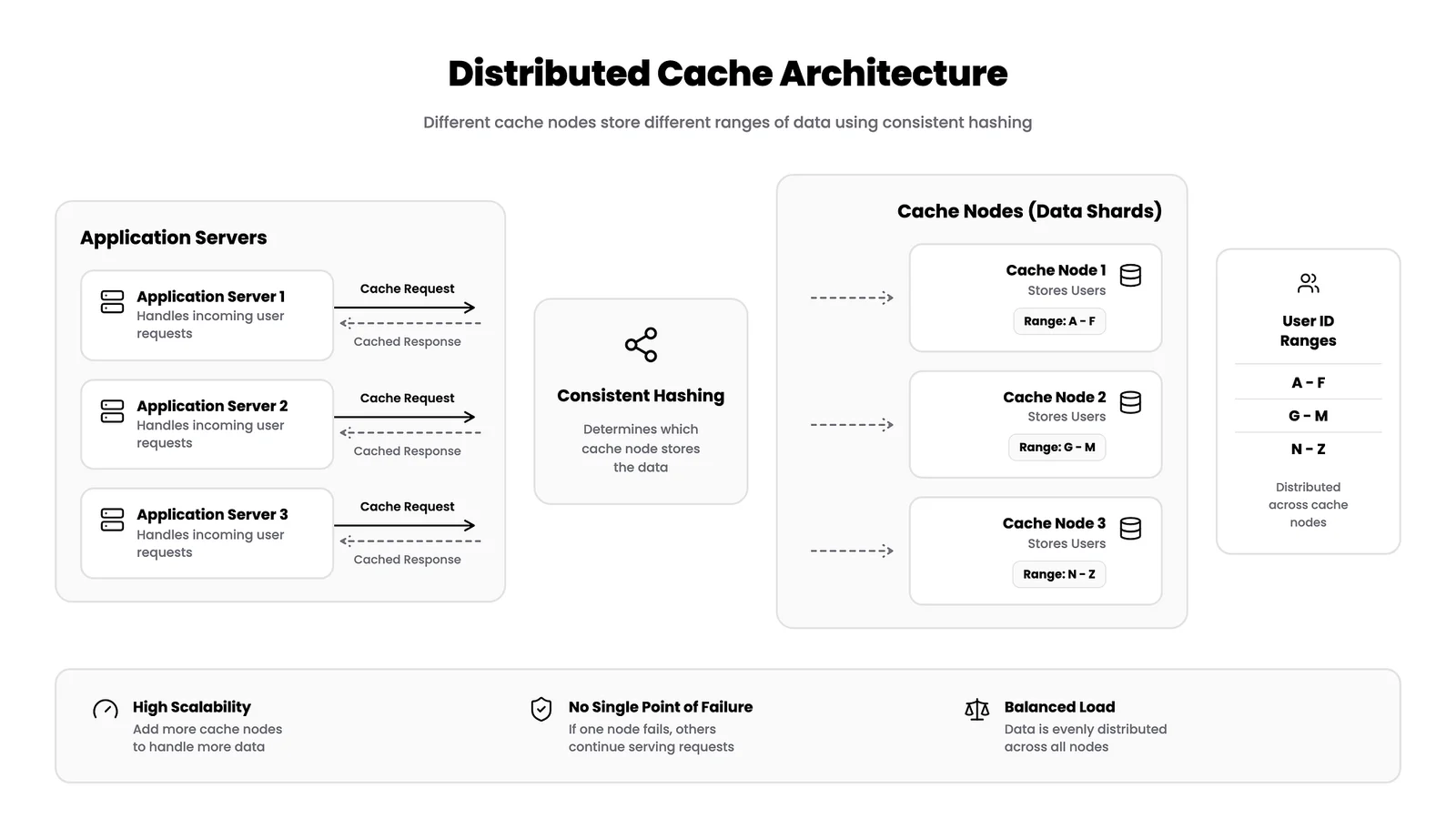
Distributed caching solves the multi-server problem by spreading cached data across multiple nodes, creating a unified cache layer accessible by all application servers.
How it works: Using consistent hashing, each piece of data is assigned to a specific cache node. All application servers know which node stores which data, enabling them to quickly locate cached items.
Popular Solutions:
- Redis Cluster
- Memcached
- Apache Ignite
- Hazelcast
Use cases:
- High-traffic applications with multiple servers
- Microservices architectures
- Real-time analytics
- Session management across server clusters
Architecture:
Advantages:
- Horizontal scalability
- No single point of failure
- Consistent cache hits across all servers
- Efficient memory utilization
Trade-offs: More complex setup and network calls between application servers and cache nodes add minimal latency.
#3. Global Cache
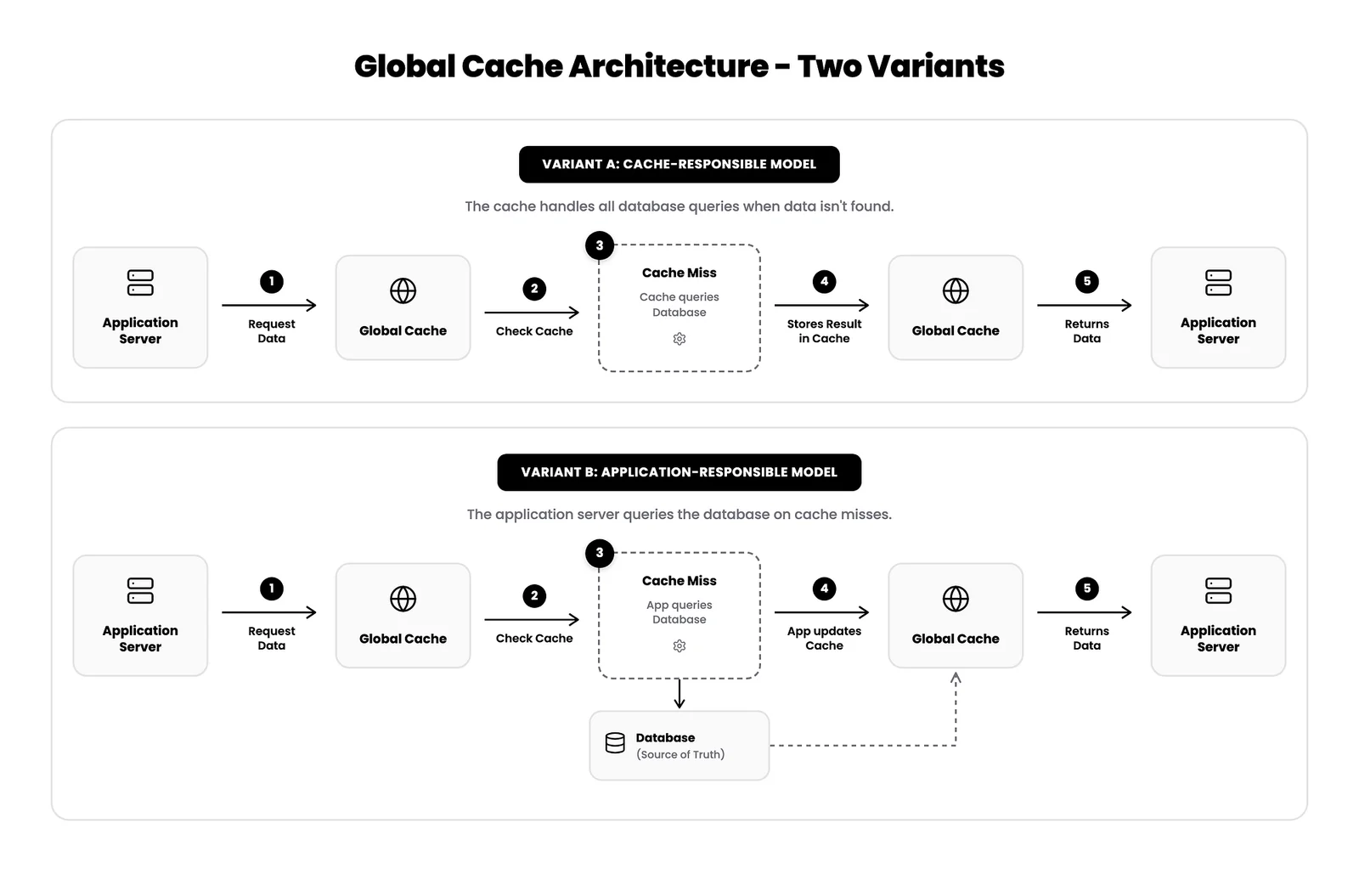
A global cache provides a single, centralized cache layer that all application servers access. Unlike distributed caching, all data lives in one logical cache system.
How it works: Every application server queries the same cache endpoint. If data isn’t cached, the cache system itself fetches it from the database and stores it for future requests.
Two Variants:
Use cases:
- Medium-sized applications (10–100 servers)
- Systems with predictable data access patterns
- Applications requiring strict cache coherence
Popular Solutions:
- Redis (single instance or sentinel mode)
- Varnish Cache
- Nginx caching
Advantages:
- Simple architecture
- Centralized cache management
- Easy to monitor and debug
Trade-offs: Single point of failure unless properly replicated, and limited by single-server memory capacity.
#4. Content Delivery Network (CDN)
CDNs are specialized caching systems designed for static content delivery images, videos, CSS, JavaScript, fonts, and HTML files.
How it works: CDNs distribute your content across dozens or hundreds of geographically distributed servers called edge locations. When a user requests a file, the CDN serves it from the nearest edge location.
Architecture:
Popular CDN Providers:
- Cloudflare
- AWS CloudFront
- Akamai
- Fastly
Use cases:
- Media-heavy websites (images, videos)
- Global applications serving international users
- Static asset delivery (JavaScript bundles, CSS)
- Download distribution
Performance Impact: A user in Tokyo accessing a US-based server might experience 200ms+ latency. With a CDN, they connect to a Tokyo edge server with 10–20ms latency a 10x improvement.
Real-World Example: Netflix uses its Open Connect CDN with 17,000+ servers in 158 countries, ensuring smooth 4K streaming by serving content from locations near users.
#Cache Eviction Policies
Cache memory is finite. When it fills up, the system must decide which data to remove. This is where eviction policies come in.
#Least Recently Used (LRU)
Removes the data that hasn’t been accessed in the longest time. Assumes recently used data will likely be needed again soon.
Best for: Web applications, session management, general-purpose caching
#Least Frequently Used (LFU)
Removes data accessed least often over time. Tracks access frequency rather than recency.
Best for: Content recommendation systems, analytics dashboards
#First-In-First-Out (FIFO)
Removes the oldest cached item regardless of access patterns. Simple but less intelligent.
Best for: Queue-based systems, simple caching scenarios
#Time-To-Live (TTL)
Sets expiration times on cached data. Items automatically expire after a defined period.
Best for: Real-time data (stock prices, weather), frequently changing content
#Cache Invalidation: The Hard Problem
Phil Karlton famously said: “There are only two hard things in Computer Science: cache invalidation and naming things.”
Cache invalidation ensures your cache doesn’t serve stale data when the underlying data changes.
#Strategies for Cache Invalidation
1. Time-Based Expiration (TTL) Set automatic expiration times on cached data.
cache.set('user:123', userData, { ttl: 300 }); // 5 minutes2. Event-Based Invalidation Invalidate cache when data is updated.
async function updateUser(userId, updates) {
  await db.users.update(userId, updates);
  cache.delete(`user:${userId}`); // Invalidate cache
}
3. Write-Through Caching Update both cache and database simultaneously.
async function updateUser(userId, updates) {
  await db.users.update(userId, updates);
  cache.set(`user:${userId}`, updates); // Update cache immediately
}
4. Write-Behind Caching Write to cache immediately, update database asynchronously.
#When NOT to Use Caching
Caching isn’t always the answer. Avoid caching in these scenarios:
1. Frequently Changing Data: Real-time stock prices, live sports scores cache invalidation overhead exceeds benefits
2. User-Specific Sensitive Data: Payment information, personal health records security and privacy concerns outweigh performance gains
3. Small Datasets: If your entire dataset fits comfortably in database memory, caching adds unnecessary complexity
4. Write-Heavy Workloads: When data is written more often than read, cache invalidation becomes a bottleneck
#Monitoring Your Cache
Track these key metrics to optimize cache performance:
Cache Hit Ratio: (Cache Hits / Total Requests) × 100
- Target: 80%+ for read-heavy applications
- Below 60%: Reevaluate your caching strategy
Eviction Rate: How often data is removed from cache
- High eviction rate: Increase cache size or improve eviction policy
Average Response Time: Compare cached vs uncached request times
- Should see 5–10x improvement for cached requests
Memory Usage: Monitor cache memory consumption
- Prevent out-of-memory errors
- Plan capacity scaling
#Best Practices for Production Caching
1. Cache at Multiple Levels Combine CDN for static assets, Redis for data, and application-level caching for a comprehensive strategy.
2. Set Appropriate TTLs
- Static content: Hours to days
- User profiles: Minutes to hours
- Real-time data: Seconds to minutes
3. Implement Graceful Degradation If cache is unavailable, fall back to database queries. Never let cache failures break your application.
4. Use Cache Warming Preload critical data during deployment to avoid initial cache misses.
5. Monitor and Alert Set up alerts for low cache hit ratios, high eviction rates, and memory pressure.
#Conclusion
Caching is one of the most powerful tools in your performance optimization toolkit. By strategically placing cache layers and choosing the right eviction policies, you can:
- Reduce database load by 90%+
- Improve response times by 10x or more
- Handle massive scale with existing infrastructure
- Deliver exceptional user experiences
The key is understanding which caching mechanism fits your specific use case:
- Single server app: Application server cache
- Multi-server app: Distributed cache (Redis Cluster)
- Simple centralized needs: Global cache (Redis)
- Static content delivery: CDN (Cloudflare, CloudFront)
Start small, measure everything, and iterate. Your users will notice the difference.


